GWGreywake Use-Case Guides
Flagship use case · Developer, Data & AI

Prompt & Context Workbench

Structure LLM prompts, estimate context usage, detect common instruction risks, define evaluation cases, and version prompt snapshots locally.

App v1.0.0Site v6.2.0Local by default
Interface preview

Working application structure

This representative capture shows the application shell and primary workspace. Actual results depend on the information entered and the workflow completed.
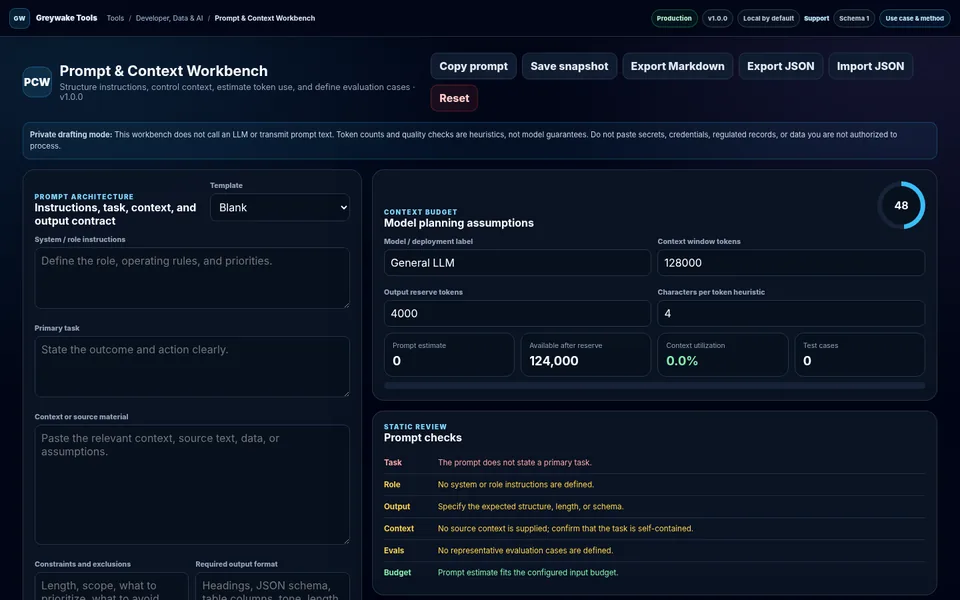
Prompt & Context Workbench application interface
Representative application interface
Desktop viewport · representative interface state
Open live application →
Visible methodAssumptions and record logic remain reviewable.
Local-first postureData handling is stated in the application.
Portable outputExports support review and continuity.
Explicit boundariesLimitations are part of the product evidence.
User and problem

Where the tool fits

Designed for: People designing reusable prompts, context packages, output requirements, and evaluation cases for language-model workflows.

Problem addressed: Prompts become unreliable when instructions, source context, constraints, output formats, examples, and evaluation criteria are mixed together without structure.

Core workflow

From input to decision-ready output

FrameStructureAnalyzeExport
1

Choose a template or define the system role, task, context, constraints, output format, and examples

Choose a template or define the system role, task, context, constraints, output format, and examples.

2

Configure the context-window and output-reserve assumptions, then review static checks and estimated usage

Configure the context-window and output-reserve assumptions, then review static checks and estimated usage.

3

Create evaluation cases, save snapshots, compare revisions, and export Markdown or JSON

Create evaluation cases, save snapshots, compare revisions, and export Markdown or JSON.

Method

Transparent calculation and record logic

The methodology is intentionally visible so users can challenge the assumptions and validate the result against authoritative evidence.

How the application works

  • Compiles labeled prompt sections in a consistent order.
  • Estimates tokens using a configurable character-to-token heuristic and reserves output capacity before calculating utilization.
  • Runs static checks for missing task definition, weak boundaries, conflicting instructions, and absent output requirements.
Illustrative output
Prompt estimate: 2,460 tokens
Available after reserve: 124,000
Context utilization: 2.0%
Quality check: 92 / 100
Boundaries

What the result does not prove

  • Token counts are heuristic and vary by model tokenizer and content.
  • Static checks cannot guarantee model behavior, factual accuracy, safety, or instruction priority.
  • No model API is called; evaluation cases are planning records rather than executed tests.
Working data remains local to this browser unless the application explicitly describes an external request or the user exports a file. Browser storage can be lost when data is cleared or the device changes.
Organizational fit

Use the method as-is or adapt it to your operating model.

Greywake can tailor fields, terminology, controls, calculations, exports, and deployment requirements. The inquiry link identifies this guide but does not transmit application data.

Discuss a tailored version →