GWGreywake Use-Case Guides
Flagship use case · Operations & Resilience

Incident Command Center

Run an incident workspace with pause-safe elapsed time, communication cadence resets, ISO chronology, prioritized actions, templates, and import/export.

App v2.0.0Site v6.2.0Local by default
Interface preview

Working application structure

This representative capture shows the application shell and primary workspace. Actual results depend on the information entered and the workflow completed.
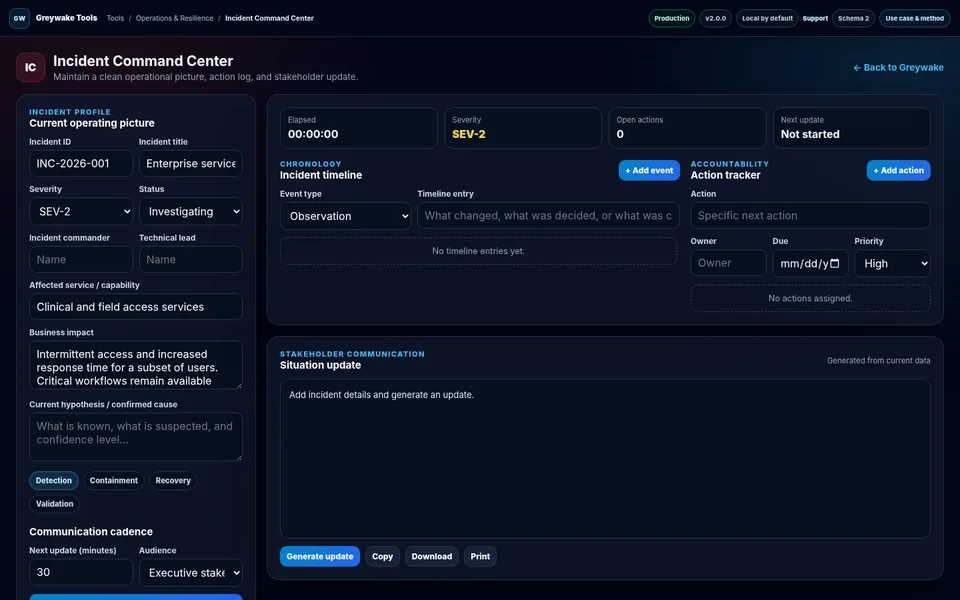
Incident Command Center application interface
Representative application interface
Desktop viewport · representative interface state
Open live application →
Visible methodAssumptions and record logic remain reviewable.
Local-first postureData handling is stated in the application.
Portable outputExports support review and continuity.
Explicit boundariesLimitations are part of the product evidence.
User and problem

Where the tool fits

Designed for: Incident commanders, technical leads, operations leaders, and communications owners coordinating a time-sensitive service disruption.

Problem addressed: Incident information often fragments across chat, notes, status calls, and individual task lists. The result is an unreliable operating picture and inconsistent stakeholder updates.

Core workflow

From input to decision-ready output

FrameStructureAnalyzeExport
1

Define the incident profile, severity, business impact, command roles, and communication cadence

Define the incident profile, severity, business impact, command roles, and communication cadence.

2

Record timestamped events and assign prioritized actions with owners and due times

Record timestamped events and assign prioritized actions with owners and due times.

3

Generate a structured stakeholder update, export the workspace, and preserve the chronology for review

Generate a structured stakeholder update, export the workspace, and preserve the chronology for review.

Method

Transparent calculation and record logic

The methodology is intentionally visible so users can challenge the assumptions and validate the result against authoritative evidence.

How the application works

  • Separates the operating picture, chronological evidence, accountable actions, and outward communication.
  • Uses a pause-safe elapsed clock and a cadence timer based on the incident start and most recent generated update.
  • Builds the update from current profile fields, recent timeline entries, open actions, and command assignments.
Illustrative output
SEV-2 · Mitigating · Recovery phase
Business impact: intermittent access for a subset of users
Open actions: 3 · Next update: 30 minutes
Boundaries

What the result does not prove

  • It does not detect incidents, monitor infrastructure, send notifications, or provide multi-user collaboration.
  • The generated brief reflects only the information entered by the user.
  • Organizations must apply their own incident policy, escalation criteria, communications controls, and record-retention requirements.
Working data remains local to this browser unless the application explicitly describes an external request or the user exports a file. Browser storage can be lost when data is cleared or the device changes.
Organizational fit

Use the method as-is or adapt it to your operating model.

Greywake can tailor fields, terminology, controls, calculations, exports, and deployment requirements. The inquiry link identifies this guide but does not transmit application data.

Discuss a tailored version →